
The 5 Levers on Your Anthropic Bill (and How to Stack Them Without Double-Counting)
Updated 2026-08-27: every rate below re-verified against current vendor pricing (Claude 5 family, GPT-5.6, Gemini 3.x). The right-size context section explains one methodology change that came out of the re-verification.
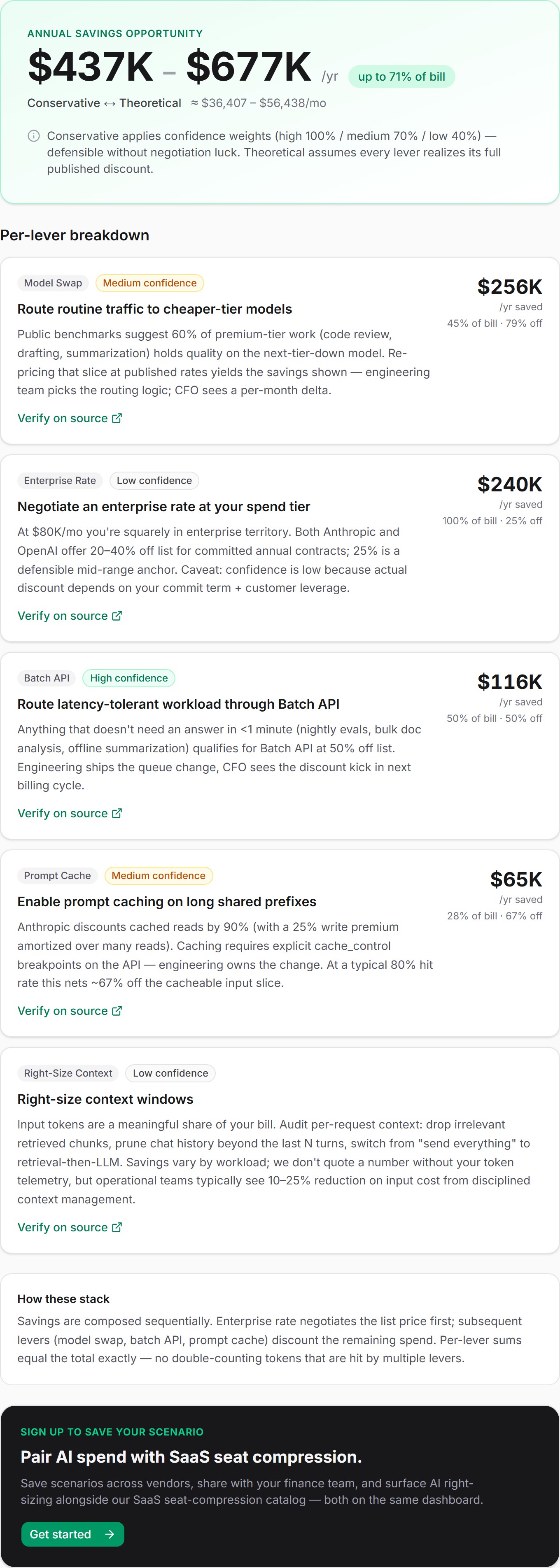
An enterprise with an $80,000-per-month Anthropic bill (60% Opus 4.8, 30% Sonnet 5, 10% Haiku 4.5, mixed workload, no prompt caching, pay-as-you-go) has between $413,000 and $636,000 of annual savings sitting on the table. The wide range is intentional. The conservative number applies confidence weights to every dollar; the theoretical number assumes every lever realizes its full published discount. A CFO presentation that quotes one without the other is either timid or unfalsifiable.
This post walks through the five levers, the source quotes that back each rate, and the sequential-residual stacking math that keeps the total from claiming you can save more than 100% of your bill. Which, embarrassingly, is what additive stacking produced when we first shipped this: 151% in the worst case before code review caught it.
Try the AI Spend calculator: 15 seconds, no signup.
Why this calculator exists
The seat-compression product we ship today answers one question: "how many SaaS seats are you paying for that nobody uses." A year of conversations with CFOs has surfaced a second, parallel question, almost always asked in the same meeting: "what do we do about our Anthropic / OpenAI / Google API bill, which used to be $5K/mo and is now $80K and growing?"
That bill behaves differently from a SaaS seat invoice. Seats are committed quantities you over-bought; token consumption is metered usage you under-optimized. The compression levers are entirely different. But the trust contract is the same as our SaaS catalog: every dollar figure traces to a vendor pricing page URL, every claim carries a literal quote, and the calculator's headline number is bounded by construction so it can't run away to numbers that fail a CFO sanity check.
We covered why anti-fabrication matters for SaaS in the calculator deep-dive. The methodology here is the same shape, applied to a different invoice.
The five levers, in the order they fire
The order matters. Sequential-residual stacking is the headline correctness fix and we'll explain why after the lever list. Briefly, each lever operates on the spend remaining after upstream levers have already fired. That's how four levers stay bounded ≤ 100% of the bill instead of overlapping and producing nonsense totals.
Lever 1: Enterprise rate negotiation
Fires first because it discounts list price, which everything downstream uses as a base. Both Anthropic and OpenAI offer committed-spend or annual contracts for customers at sufficient scale. The published claim from Anthropic's enterprise contact page is "Anthropic enterprise plan: custom pricing for committed-spend customers." Real customer reports cluster between 20% and 40% off list. We anchor at 25% as a defensible mid-range and tag the lever confidence: "low" because actual discount depends on commit term, leverage, and how badly your account manager wants to close before quarter-end.
The threshold we use is $50,000/month, per ENTERPRISE_RATE_THRESHOLD_MONTHLY_USD in the rates file. Below that, the lever doesn't apply; vendors won't bother with the procurement conversation. Above it, you should at minimum ask for the meeting.
Applied to $80K/mo: 25% × $80,000 = $20,000/mo, or $240,000/year, against the full bill. Residual after this lever: $60,000/mo.
Lever 2: Model swap
Fires second because it lowers the per-token rate on the residual. Anthropic's pricing docs list Opus 4.8 at $5 per million input tokens and $25 per million output (sourceUrl: https://platform.claude.com/docs/en/about-claude/pricing). Sonnet 5 lists at $2/$10, and that rate is now permanent: the $2/$10 pricing announced at launch as introductory through August 31, 2026 is the standard price going forward. Haiku 4.5 is $1/$5. At the top of the ladder, Claude Fable 5 and Mythos 5 both list at $10/$50. The math question is what fraction of premium-tier traffic can move down a tier without meaningful quality loss.
We anchor at 50% of Fable 5 (or Mythos 5) traffic swap-able to Opus 4.8, 60% of Opus traffic swap-able to Sonnet, and 30% of Sonnet traffic swap-able to Haiku, per the MODEL_SWAP_SHARES constants. The frontier share is deliberately the lowest: teams that chose Fable chose it on purpose, so only the routine half is safely swappable. These shares are calibration defaults, not benchmark claims. Code review, drafting, summarization, classification, the workloads where you don't need frontier reasoning, are typically swap-able. Frontier reasoning, complex agentic loops, novel research, those stay on the premium model. The lever is tagged confidence: "medium" because the right swap rate depends on your evals, not ours.
For OpenAI customers, the swap chain is GPT-5.6 Sol ($4/$20) → GPT-5.6 Terra ($2/$12) at 50% of traffic, then Terra → Luna ($0.20/$1.20) at 30% (sourceUrl: https://developers.openai.com/api/docs/pricing). For Google, Gemini 3.1 Pro ($2/$12) → 3.7 Flash ($0.75/$3.75) at 50% (sourceUrl: https://ai.google.dev/gemini-api/docs/pricing). The math is identical: compute blended input/output cost at workload weights, compare the cheaper-model blend, only credit savings where the cheaper tier is actually cheaper. The full algorithm is in src/lib/ai-spend/levers.ts, modelSwap.
Applied to the Anthropic example, mixed workload (40% input / 60% output weighting):
- Opus 4.8 blended cost: $5 × 0.4 + $25 × 0.6 = $17 per million tokens
- Sonnet 5 blended cost: $2 × 0.4 + $10 × 0.6 = $6.80 per million tokens
- Sonnet vs Opus reduction: 1 − $6.80 / $17 = 60%
- 60% of the bill on Opus × 60% swap rate = 36% of bill touched at a 60% rate cut
- Sonnet → Haiku reduction is 50% (Haiku 4.5 blends to $3.40 per million) on the 9% of bill that qualifies (30% Sonnet × 30% swap)
- Combined touchedShare = 45% of bill at a saving-weighted 58% discount
That works out to $15,660/mo realized (45% × 58% × $60,000) after the enterprise discount has already chopped the residual; the same swap against the full bill would be $20,880. Residual now: $44,340.
Lever 3: Batch API
Fires third because it time-segregates a share of the post-swap residual. All three vendors publish a flat 50% batch discount. The Anthropic quote, per the pricing docs: "a 50% discount on both input and output tokens." OpenAI's discount reads straight off the published batch column, where every price halves: "gpt-5.6-terra batch $1.00/$6.00 (standard $2/$12)." Google's is the bluntest of the three: "50% cost reduction."
This lever is tagged confidence: "high"; it's the most defensible number on the page. The discount is published, the implementation is a queue change, and there's no negotiation involved. The only judgment call is what fraction of your workload tolerates ≤24-hour latency. Anything real-time (chat UI, voice agents, interactive code completion) doesn't qualify. Anything offline (nightly evals, bulk document processing, summarization pipelines that don't need an answer in under one minute) does.
The calculator asks for realtimeShare as a slider; at 50% real-time, half your bill qualifies for batching, and the effective discount is 25% of the residual (0.50 × 0.50).
Applied to the example, assuming 50% real-time: $44,340 × 50% × 50% = $11,085/mo. Residual: $33,255.
Lever 4: Prompt cache
Fires fourth because it content-segregates the input slice of the post-batch residual. Anthropic's pricing table reads "Cache read (hit) | 0.1x base input price; 5-minute cache write | 1.25x base input price." OpenAI now prices cached input at roughly 10% of the standard rate on GPT-5.x models; we derive that from the published per-model cached-input column, e.g. "gpt-5.6-terra: $2.00 input, $0.20 cached input." Google's context caching also prices cached reads at roughly 10% of standard input, with a separate storage fee we exclude from the multiplier because it's workload-specific.
The vendor asymmetry matters. Anthropic caching requires explicit cache_control breakpoints in the API; engineering has to opt in. OpenAI applies the cached-input rate with no opt-in required, which means an OpenAI customer who answers "no cache" in our calculator may already be getting some of this discount silently; the calculator's reason copy explicitly flags that. We don't double-count what's already in the bill.
The applicability defaults: 70% of input tokens are typically cacheable (the shared system-prompt prefix), at an 80% hit rate at steady state. The net Anthropic savings multiplier on cacheable input is 0.8 × (1 − 0.10) − 0.2 × 0.25 = 0.67, 67% off the cacheable input slice; OpenAI and Google, with no write premium, net 0.8 × 0.90 = 0.72, or 72%. For mixed workload (40% input weighting), applicableShare = 0.4 × 0.7 = 0.28. The lever is tagged confidence: "medium" because hit rate varies materially with prompt structure.
Applied to the example: $33,255 × 28% × 67% = $6,238.64/mo. Residual: roughly $27,016.
Lever 5: Right-size context
Always last, and in this example still zero dollars. This lever got the biggest rework of the five, and the reason is a pricing change worth being honest about. Earlier versions of this post modeled a rate-tier arbitrage: long-context requests billed at a premium, so trimming a request under the 200k-token threshold dropped it to a cheaper tier. Anthropic has since removed that premium. The pricing docs now state: "Claude 4.6 and later models include the full 1M token context window at standard pricing." There is no cheaper tier to drop to on current Claude models, so a lever built on that delta would be quoting a discount that no longer exists. We updated the lever when we re-verified the pricing. That is the trust contract working as intended: when the vendor's page changes, our math changes with it.
What survives is the token-count argument. Long-context requests are token-heavy by construction, so pruning retrieval and chat history still cuts real input dollars even at flat rates. When we have your actual cost report (the Growth+ dashboard's Anthropic integration), the lever models it as spend × long-context share × input share × 0.5 reducible × 0.5 token cut, tagged confidence: "medium" because the spend slice is actual but the reduction is heuristic. On the public calculator's slider path, which is what this example uses, it stays a $0 advisory: audit per-request context, drop irrelevant retrieved chunks, prune chat history beyond the last N turns, switch from "send everything" to retrieval-then-LLM patterns. Operations teams typically see a 10-25% input-cost reduction from disciplined context management, but we don't bake that into the headline because we can't see your prompts.
One place a real rate premium does survive: Gemini Pro models. Gemini 3.1 Pro bills $2 input / $12 output up to 200k tokens and $4 / $18 above it, so for Google customers, keeping requests under 200k still halves the input rate on that slice. The calculator's Google copy calls that out explicitly.
The total: $52,983.64/mo realized, $635,803.68/yr theoretical
Sum across the four numeric levers:
| Lever | Monthly | Confidence |
|---|---|---|
| Enterprise rate | $20,000 | low |
| Model swap | $15,660 | medium |
| Batch API | $11,085 | high |
| Prompt cache | $6,238.64 | medium |
| Total realized | $52,983.64 | mixed |
Annualized, that's $635,803.68, the upper bound of the range in the calculator hero. By construction the monthly total is ≤ $80,000 (the monthly bill). It cannot run away to "save more than you spend" because each lever operates on the spend remaining after upstream levers. The arithmetic is in calculateAiSpendSavings in src/lib/ai-spend/calculate.ts.
Why additive stacking is wrong (and how we caught it)
The first version of this calculator added the levers up. Enterprise saves 25%, model swap saves another ~30%, batch saves another ~25%, cache saves another 20%; sum: roughly 100%. Looked fine on paper. Looked wrong on the dev server: a default scenario rendered 116.9% total savings. The worst-case run hit 151%.
The root cause is that the four levers touch overlapping facets of the same tokens. A single premium-model token used inside a long shared prefix that runs in a nightly batch job on an enterprise contract is discounted by all four levers. Additive stacking counts that token four times. Sequential-residual stacking counts it once.
Mechanically: the four levers fire in the order enterprise_rate → model_swap → batch_api → prompt_cache (the order in ALL_LEVERS from src/lib/ai-spend/levers.ts). Each operates on the residual spend after upstream levers have already fired. Per-lever realized savings = applicableShare × effectiveDiscount × residual. The orchestrator updates the residual after each lever:
residual = monthlyTotalUsd
for each applying lever:
  realized = applicableShare × effectiveDiscount × residual
  residual = max(0, residual − realized)
By construction, the per-lever sum equals total ≤ monthlyTotalUsd. We added five regression tests to pin the invariant.
Reordering changes per-lever attribution but not total savings, within float precision. The order we picked has a finance logic: negotiate the unit rate first (enterprise), then optimize the per-token cost (model swap), then time-segregate (batch), then content-segregate (cache). It's the order a procurement-savvy finance team would walk a vendor through.
This is the methodological claim we'd push back on if a competitor FinOps tool (Vantage, CloudZero, Spendflo's AI module) shows you a stacked-savings number without explaining how the levers compose. If they're adding, they're producing impossible totals on some non-trivial fraction of their customer base. If they're sequencing, they should be able to tell you the order.
Conservative vs. theoretical: the range hero
The calculator hero reads $413K - $636K/yr · Conservative ↔ Theoretical. The theoretical number is the $635,803.68 we just computed, the sum of per-lever realized savings with no quality adjustment. The conservative number applies a confidence weight to each lever before summing:
- High confidence × 1.0
- Medium × 0.7
- Low × 0.4
These weights are pinned in CONFIDENCE_WEIGHTS (src/lib/ai-spend/types.ts) and calculate.test.ts. The conservative aggregation for the same example:
| Lever | Realized | Weight | Weighted |
|---|---|---|---|
| Enterprise rate | $20,000 | 0.4 | $8,000 |
| Model swap | $15,660 | 0.7 | $10,962 |
| Batch API | $11,085 | 1.0 | $11,085 |
| Prompt cache | $6,238.64 | 0.7 | $4,367.05 |
| Conservative monthly | $34,414.05 |
Annualized: $412,968.58, the lower bound of the range. Notice that the enterprise-rate lever, which is the biggest realized number, gets the steepest haircut because it's the one that depends most on negotiation outcome. That asymmetry is on purpose: a CFO talking to a board wants the conservative floor to discount the speculative line items the most. The high-confidence number (Batch API) passes through at 100%.
We render the range as the headline rather than burying the floor in a footnote. Both numbers carry the same visual weight, side by side. The conservative floor is the one a CFO defends to a board; the theoretical maximum is the one she takes into the negotiation with Anthropic procurement.
What this means for the catalog side
AI agent deployments themselves are a SaaS-spend lever; we covered the seven canonical cases in the AI-agents shortlist. The two products talk to each other. A company deploying Harvey AI for legal contract review is shifting some of its $80K Anthropic bill into Harvey's per-user pricing. Whether that's a net win depends on the Harvey contract terms, the legal-team seat count, and how much of the work was running on Opus when it could have run on Sonnet.
That's exactly the kind of trade-off both calculators surface side by side on a Growth+ dashboard. The seat compression product tells you which SaaS seats are wasted and which AI agent deployments unlock against your headcount. The AI Spend calculator tells you what fraction of your direct API bill is recoverable without changing your model choice. Most enterprises we've talked to have both problems, and the savings stack in the obvious direction: you take the API discounts first, then layer agent deployments on top.
The CFO bottom line
If your monthly Anthropic, OpenAI, or Google API spend is north of $50,000, you are leaving money on the table the size of a senior engineer's annual comp, minimum. In this post's example the four numeric levers compose to 66% of the bill on the theoretical stack and 43% on the conservative floor. The exact number depends on your workload mix, your realtime share, and how much leverage your account team will admit you have.
Three things a CFO can do this week without engineering involvement:
1. Ask for the enterprise-tier conversation. At $50K+/mo, you're squarely in the bracket where the account manager has discretion. The 25% number we model is conservative; the published range goes to 40% for committed annual contracts. The downside risk is one meeting.
2. Audit your real-time share honestly. Most teams discover that 30-50% of what they assumed was real-time is actually overnight evals, bulk document processing, or summarization pipelines that nobody waits on. That's straight 50%-off-list money if engineering moves it to the Batch API. All three vendors publish the batch discount explicitly.
3. Check your prompt cache status. OpenAI customers on GPT-5.x are already billed cached input at roughly 10% of the standard rate with no opt-in; check the dashboard to see how much of your input is hitting it. Anthropic customers running long shared prompts without cache_control breakpoints are paying the full input rate on tokens that could bill at 10% of it.
The methodology we're using to model all of this (every rate quoted against a vendor pricing page URL, every claim anchored to a literal quote, totals bounded by construction) is the same anti-fabrication trust contract that runs the SaaS catalog. A CFO can audit any number on the screen back to the source. That's the bar we hold for the seat-compression product, and it was non-negotiable when we scoped this one.
Try the AI Spend calculator: 15 seconds, no signup. Plug in your vendor, your monthly spend, your model mix, and the workload type. You'll have the range number, and the per-lever breakdown, before your next 1:1 with the CTO.
Updated August 27, 2026
Find your savings number in 30 seconds.
No signup, no credit card. Get the number, screenshot it, and decide if your CFO needs to know about us.