
When the CFO Asks 'Who Approved That?' — SaaS Governance + Audit Logs
Every CFO at a 5,000-employee company has been in this meeting. The board reviews quarter-over-quarter SaaS spend. A line item moved. Someone — usually the audit committee chair, sometimes general counsel — asks the question that ends careers: "Who approved that?"
The honest answer at most companies is: nobody knows. There's an email chain on someone's laptop, a Slack thread someone deleted, a PowerPoint from a procurement off-site, and a renewal that auto-fired six months ago without ceremony. Finance ops can usually reconstruct the what and the when, but the who approved this — and the what data did they see when they approved it — is forensics, not record-keeping.
That gap is the reason a CFO at a regulated company needs an append-only audit log on every SaaS spend decision. Not for compliance theater. For the moments when reconstructing decision history three months later is the difference between a clean audit and a finding.
Try the free calculator — 15 seconds, no signup.
What an audit log actually looks like
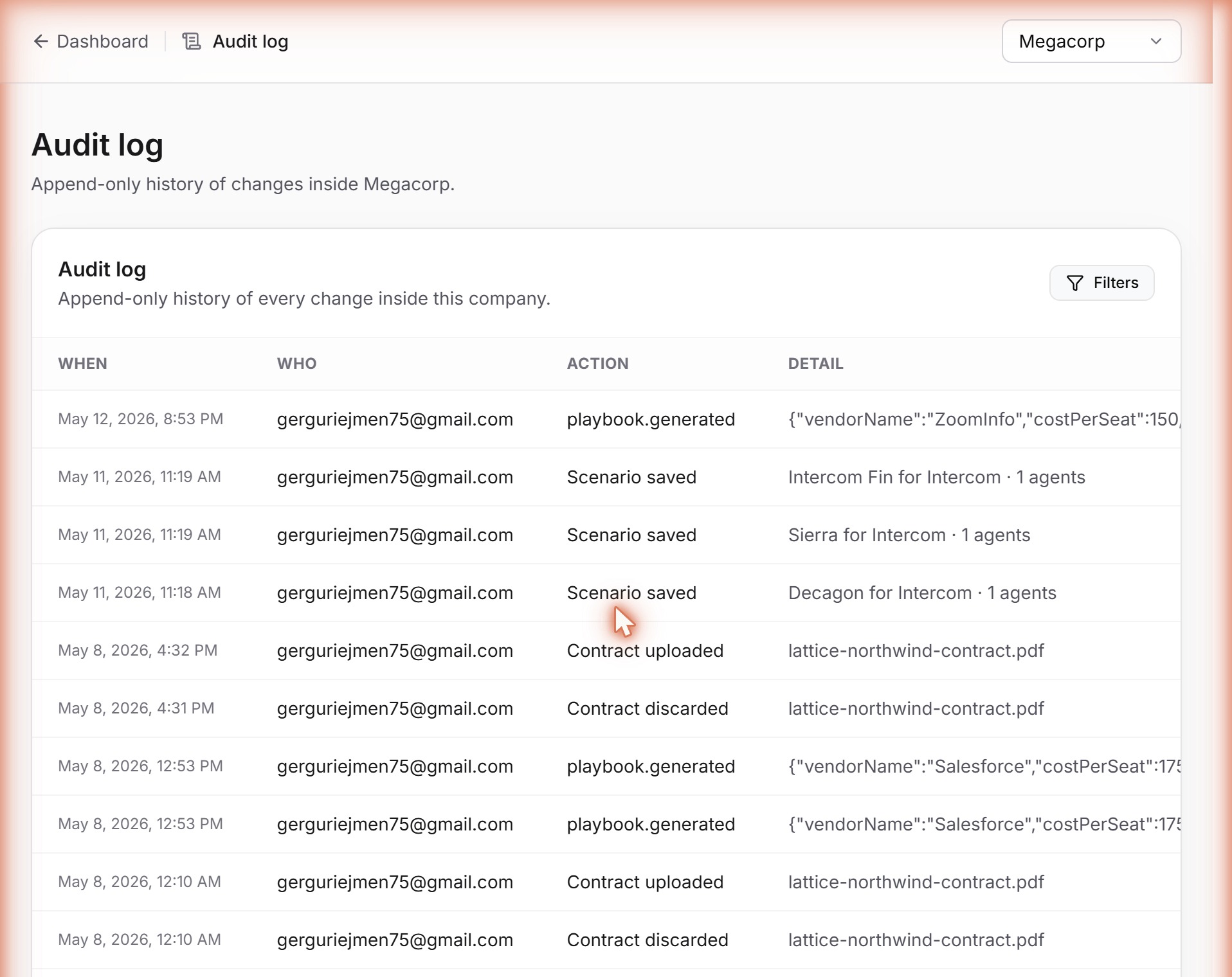
Four entries pulled from a live SeatCompress dashboard, captured this week from a customer running a quarter-end renegotiation cycle. Verbatim, payloads trimmed for the JSON-allergic:
May 12, 2026, 8:53 PM · gerguriejmen75@gmail.com · playbook.generated · {"vendorName":"ZoomInfo","costPerSeat":150,"regenerated":false,"daysUntilRenewal":...}
May 11, 2026, 11:19 AM · gerguriejmen75@gmail.com · Scenario saved · Intercom Fin for Intercom · 1 agents
May 8, 2026, 4:32 PM · gerguriejmen75@gmail.com · Contract uploaded · lattice-northwind-contract.pdf
May 8, 2026, 12:53 PM · gerguriejmen75@gmail.com · playbook.generated · {"vendorName":"Salesforce","costPerSeat":135,...}
Each row is one immutable record of a single state-changing action. Timestamp, actor email, action namespace, payload of context. For playbook.generated: the vendor, the per-seat cost the playbook was generated against, the days-until-renewal, whether regenerate was pressed. For Scenario saved: the scenario name and agent count. For Contract uploaded: the literal filename.
The format is deliberately unglamorous. Audit logs are a compliance primitive, not a UI achievement. The value is that every row is append-only — no edit button, no delete button, no admin override. Once written, the record stays.
Why traditional tools fail at this
Most procurement and finance stacks have an "audit-log feature." Most aren't actually audit logs. They're activity feeds — chronological UI lists with edit-history rollback baked in. The data lives in the same tables as the entities being audited, which means the same admin who can change a contract value can change the record of who changed it.
That distinction matters because an audit log's only job is to survive an adversarial review. A SOC 2 auditor, a board member with a hostile question, a vendor account exec disputing prior conversations — all three read the log against the actor's interest. If the log can be retroactively edited by the same actor whose actions are being audited, it does not survive scrutiny.
The SaaS spend management category is particularly weak here. Zylo, Vendr, Productiv, Tropic — all four have some version of an activity feed. None expose, in their default configurations, an immutable append-only log with row-level retention guarantees a SOC 2 Type 2 auditor would accept as evidence. The dashboards are designed for finance ops to scan, not for an auditor to subpoena. (Here's how the major spend-management platforms compare.)
That's a function of who their original customer was: the finance ops analyst at a 200-person Series B who wanted to know which user added the new Notion seat. An activity feed satisfies that. The CFO at a 15,000-employee public company prepping for a quarterly auditor review needs a different artifact.
The four use cases that demand append-only
1. SOC 2 Type 2 evidence
The auditor will ask, in some form: "Show me evidence of segregation of duties on vendor renegotiations." They want a queryable log showing that the person who approved the change is not the same person who requested it, with timestamps proving the temporal sequence.
If your evidence is an Outlook folder and a PowerPoint, you spend two weeks of finance ops time reconstructing decision history per vendor, per quarter. If it's a queryable audit log exported as a CSV, you spend an hour. The cost of not having the log is paid in finance ops salary, not in audit fees.
A note on framing: SeatCompress itself is not yet SOC 2 Type 2 certified. Our pricing page says "security review on request" rather than displaying a badge — pre-SOC2 startups are usually less honest about that. The audit log inside the product is infrastructure customers in regulated industries use to prep for their audits. It works the same way regardless of our own certification status.
2. Board reporting on quarterly spend posture
The board question is usually: "What changed in our SaaS spend posture this quarter?" The CFO's instinct is to answer with a total-spend chart. That's incomplete — the board is asking about governance, not expense.
The right answer is a filtered audit log: every state-changing action across the SaaS portfolio, grouped by action type, scoped to the quarter. Contracts uploaded. Contracts discarded. Renegotiation playbooks generated. Scenarios saved and compared. Tools added and removed. Members invited and roles changed. Each row tied to actor and timestamp.
That answer demonstrates SaaS spend is governed, not just tracked. It survives a follow-up from the audit committee chair. It produces a defensible record if posture is later challenged. The query is one filter against a single table.
3. Procurement governance + multi-user approval flow
The workflow at a 10,000-employee company: a SaaS owner — IT manager or department head — wants to renegotiate. They generate a playbook, attach utilization data, hand it to finance. Finance reviews and approves or modifies. The CFO signs off on anything above a threshold. The vendor receives the email.
Without multi-user governance, this entire flow happens in one person's account — usually the procurement analyst's — with the CFO copied on emails. The audit trail is implicit. The same person who generated the analysis is the same person who acted on it.
With proper multi-user teams, each step is a separate actor logged separately. SeatCompress models this via the CompanyMember table — one row per (user, company) with a role: owner, admin, member, or viewer. The requireRole helper enforces the check server-side on every mutation route. A viewer cannot generate a playbook. A member can generate one but cannot delete a company. An admin can invite new members but cannot transfer ownership. The CFO doesn't police the permission boundaries — the server does.
The audit log catches the sequence: member generated the playbook at 11:03, admin reviewed the scenario at 14:17, owner approved the subscription change at 16:42. Three rows, three actors, one continuous record.
4. Vendor pushback defense
Nobody puts this on a marketing page, but every CFO recognizes it. You're on a renewal call. The vendor AE claims, with practiced casualness, "We already had this conversation last year — your team agreed to the 8% escalator." The CFO knows this is probably not what happened, but the conversation was eighteen months ago, the procurement lead has since left, and the email chain is buried in someone's archived inbox.
The audit log gives you a queryable, defensible record. Search by vendor name, filter to playbook.generated, pull payloads. "We generated a renegotiation playbook against your contract on March 12, 2025, anchored on the CPI cap from the original MSA. We did not agree to an 8% escalator. Here are the timestamps of the four regenerations leading up to renewal." That conversation ends differently than reconstruction from memory.
The renegotiation playbook anatomy post walks through what the auto-generated playbook contains; the audit log proves which version was sent, when, and who clicked generate. Vendor AEs lose the re-anchoring game when the customer has a timestamped, immutable record of every prior touchpoint.
The honest pre-SOC2 framing
A reasonable CFO at a regulated company will ask: "If you're not SOC 2 Type 2 yourself, why should I trust your audit log as system of record for my audit?"
First, the audit log is data the customer can export at any time — CSV, API pull, or direct database access on Enterprise contracts. Not vendor-locked. The records are yours regardless of whether SeatCompress is still your vendor a year from now.
Second, the underlying controls that would be reviewed in our SOC 2 are already in place: Row Level Security on every public table, AES-256-GCM encryption of integration tokens at rest, HMAC-validated unsubscribe and invitation tokens, three-layer trial-abuse defense, Sentry monitoring, all-Vercel-Pro infrastructure with signed-commit auto-deploys. We can answer a CAIQ or SIG-Lite questionnaire today. The badge is not the same as the controls; the controls came first.
Third, the audit-log infrastructure was designed for your SOC 2, not ours. Writes happen on every tier — storage at this scale is negligible — so a customer upgrading to Enterprise sees backfilled history all the way back to first use. A flaky audit write never blocks the user's action; the row goes missing, the action commits, Sentry captures the exception. Soft guarantee on completeness, hard guarantee that audit infrastructure can't take the product down.
This combination — public security page, questionnaire response, audit-log infrastructure designed for the customer's own audit — is the framing Notion, Linear, and most of their peers used pre-certification. It clears procurement at every enterprise prospect we've talked to since the feature shipped.
What action types we actually log
The full catalog lives in src/lib/audit/actions.ts as a single-source-of-truth const. Current coverage:
- Tool lifecycle —
tool.added,tool.updated,tool.removed,tools.imported(CSV bulk) - Contract pipeline —
contract.uploaded,contract.confirmed,contract.discarded - Scenarios —
scenario.created,scenario.deleted - Renegotiation —
playbook.generatedwith vendor + cost + renewal-days payload - Members + invitations —
member.invited,member.invitation_cancelled,member.accepted,member.role_changed,member.removed - Integrations —
integration.connected,integration.disconnected(Okta, Azure AD, Google Workspace) - Company-level —
settings.updated,subscription.changed,analysis.created
System actions (Stripe webhook, scheduled crons) write with userId=null so the actor field makes it clear no human was at the keyboard. The Audit tab UI is Enterprise+ tier-gated for reading; the writes happen on every tier — deliberate, so a customer who upgrades doesn't discover they have no prior history.
What the activity-feed crowd will ship next
Within twelve to eighteen months, the major SaaS spend platforms will ship some version of "audit log" branding. Most will be re-skins of existing activity feeds. Three questions distinguish the real thing:
- Can a workspace admin edit or delete an audit log entry? If yes, it's an activity feed.
- Is the log retained beyond the current billing period? If no, it's an activity feed.
- Is the write atomic with the action it audits, or async after the fact? Async drops events on crash.
SeatCompress's answers: no admin edit UI, append-only at the data layer; retention is unlimited; atomic — writes go through logAuditEvent inside the same Prisma transaction as the action they record.
Not glamorous infrastructure. Doesn't produce a marketing screenshot. It is the thing CFOs at regulated companies are quietly auditing in tool selection right now, and a meaningful share of mid-market enterprise deals over $250K ARR are losing on this dimension without ever telling the vendor why.
The bottom line
"Who approved that?" has a structural answer or a forensic answer. The forensic answer — email chains, PowerPoints, Slack archaeology — costs finance ops time and produces unreliable testimony. The structural answer — queryable, append-only, timestamped, actor-attributed — costs nothing in the moment and produces evidence that survives an auditor.
If you're a CFO at a 5,000-to-50,000-employee company evaluating SaaS spend tooling, ask the three diagnostic questions before you let the demo run. Dashboard depth doesn't matter if the underlying record-keeping won't survive a real audit. Related reads: the hidden cost of auto-renewal clauses for what gets approved without anyone noticing, the auto-renewal traps playbook for the operational side, the spend-management platform comparison for where the category sits today.
Try the free calculator — 15 seconds, no signup. No login required. If your company has multiple SaaS owners and a real audit committee, the audit-log surface is one of the upgrade reasons — and the hardest to retrofit if you skip it now.
Find your savings number in 30 seconds.
No signup, no credit card. Get the number, screenshot it, and decide if your CFO needs to know about us.